This article explains how to withdraw the last offer or bid during the final bidding or offer stage
During the Final Bidding or Offer Stage, the "Withdraw" button will be replaced with "Withdraw my last offer" or "Withdraw my last bid"

Instructions to withdraw your last offer or bid in the final stage
- Visit the negotiation page and select the "Withdraw my last offer" or "Withdraw my last bid" button under the agent information to the right of screen.
- You will be asked to confirm the withdrawal
- The countdown timer clock will pause and the agent will be asked to confirm the withdrawal request
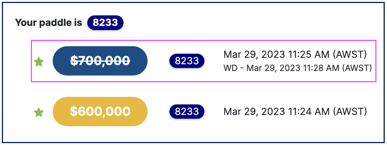
- Once approved, the last offer or bid will be withdrawn and represented by a strikethrough on the timeline and the countdown timer will restart
Was this article helpful?
That’s Great!
Thank you for your feedback
Sorry! We couldn't be helpful
Thank you for your feedback
Feedback sent
We appreciate your effort and will try to fix the article