This article provides instructions for agency administrators on how to approve or discontinue agency membership
Agency Admin users can manage agency information and approve or revoke agency memberships when a new agent joins the agency or an existing agent departs.
Instructions to edit agency membership for a new or existing agent
- Navigate to Settings and Agents. These are the users currently associated with the agency.
- Select the pencil icon to for the agent you wish to approve or discontinue agency membership
- Select Agent tab
- Select the dropdown box under Agency Membership and update as needed
- Active agents should have a status Approved
- Previous agents that are no longer with the agency should have a status Discontinued
- Agents that apply but do not work for the agency should be Rejected
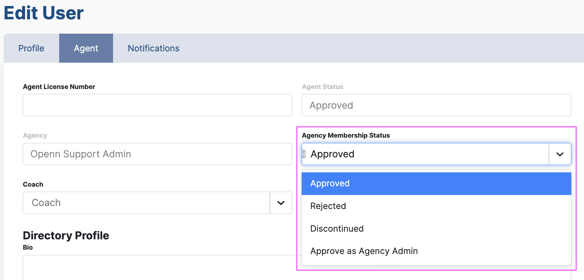
Unlike the Agent Membership Status which can be managed by Agency Administrators, only an Openn Administrator has the ability to approve, discontinue or reject Agent Status. Please contact Openn Support if you have an agent joining your agency where their Agent Status is Pending.
Was this article helpful?
That’s Great!
Thank you for your feedback
Sorry! We couldn't be helpful
Thank you for your feedback
Feedback sent
We appreciate your effort and will try to fix the article