Invite a withdrawn buyer to rejoin the negotiation
- Navigate to the property page
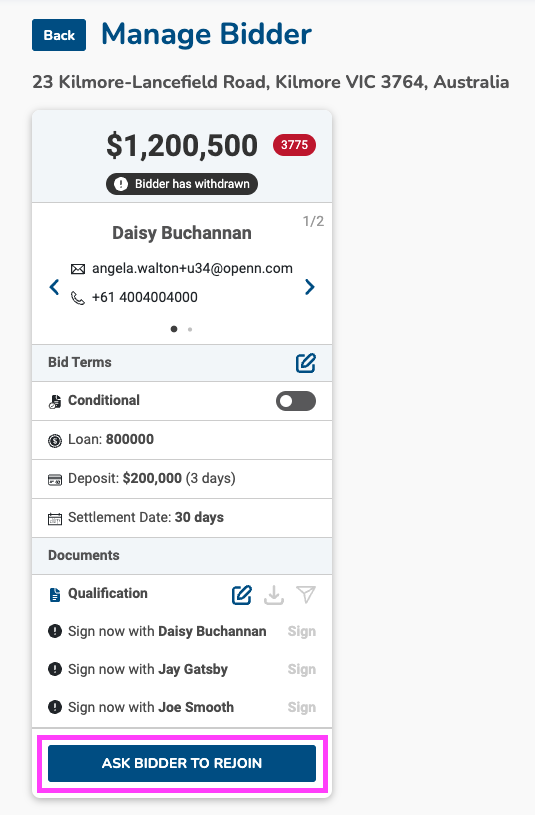
- Click on the Buyers tab and then on the buyer name to open the Manage Buyer screen
- At the bottom of the screen, select Ask bidder to rejoin
- Once selected, the status of the buyer will change from Withdrawn to Rejoin
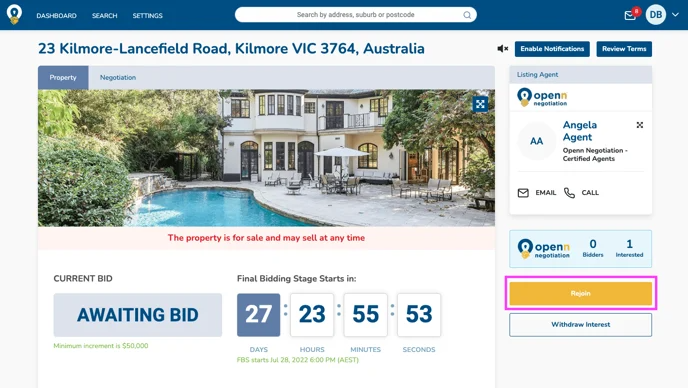
- The buyer will receive a notification via email and next time they visit the property, a Rejoin button will be available for them to place a new bid as pictured below.
If a buyer is withdrawn from a negotiation, they can only participate on the negotiation again, if re-invited by the agent.
The buyer will receive a notification via email and next time they visit the property, a Rejoin button will be available for them to place a new bid as pictured below.
Was this article helpful?
That’s Great!
Thank you for your feedback
Sorry! We couldn't be helpful
Thank you for your feedback
Feedback sent
We appreciate your effort and will try to fix the article